Pay in installments of $5.04 with
 ,
,
 and
and

Shipping Estimate
USA
- USA
- CAN
- USA
- CAN
Ships within 48 hours · Estimated delivery Jul 1 - Jul 6
 Promo Codes Available:
For Your Every Summer RSVP, with Code: SUMMER15
Description
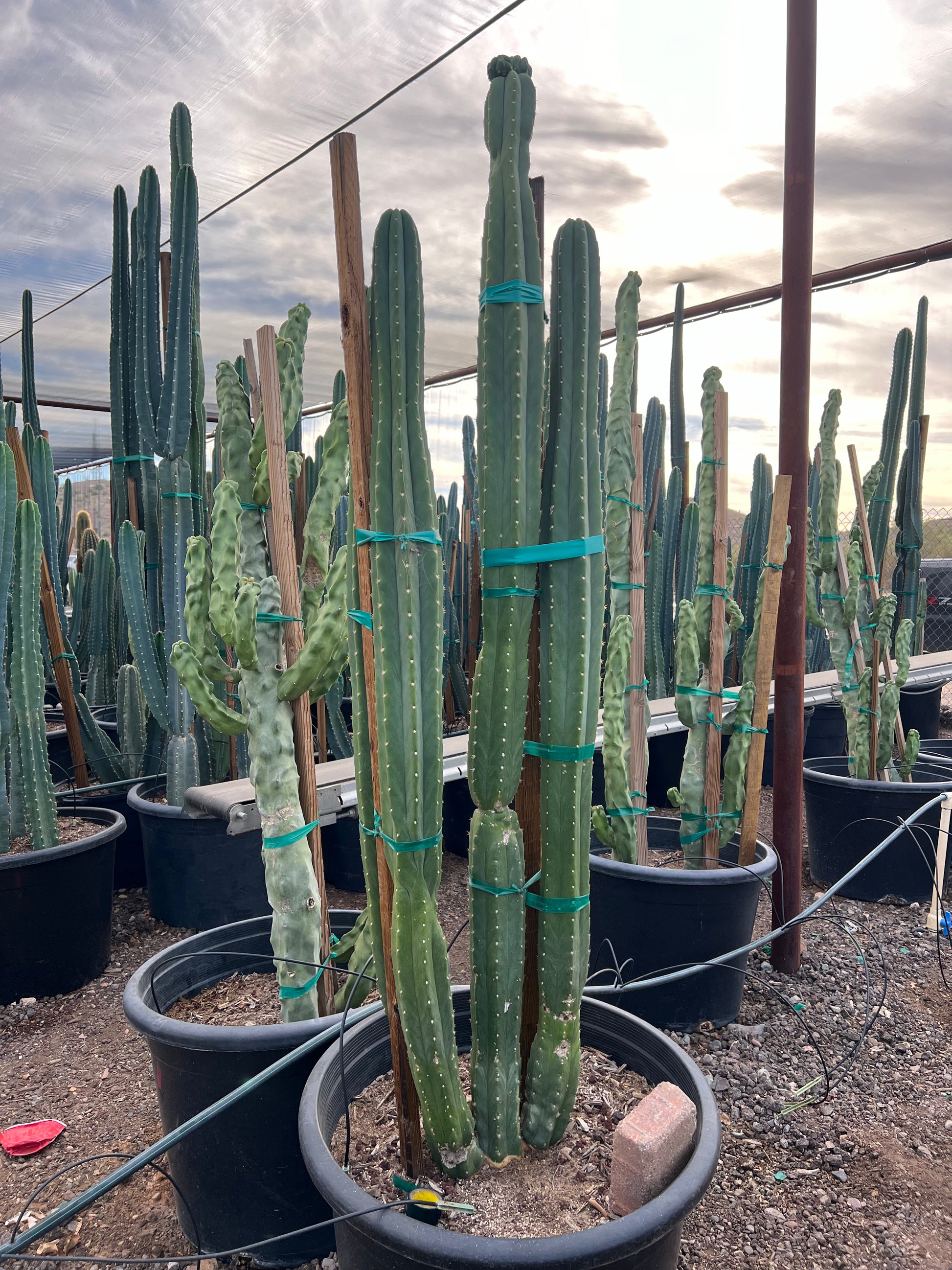
buy san pedro cactus online Buy San Pedro Cactus Phoenix, AZ | Echinopsis pachanoiA Towering Columnar Cactus for Phoenix Desert Gardens San Pedro The San Pedro Cactus (Echinopsis pachanoi) is one of the fastest growing columnar cacti available for Phoenix landscapes. Native to the Andes Mountains, this striking blue green cactus grows tall, ribbed columns that branch with age into dramatic multi stemmed specimens. San Pedro can reach 1020 feet tall in the Phoenix Valley, adding bold vertical structure to xeriscape gardens,
A Towering Columnar Cactus for Phoenix Desert Gardens — San Pedro
The San Pedro Cactus (Echinopsis pachanoi) is one of the fastest-growing columnar cacti available for Phoenix landscapes. Native to the Andes Mountains, this striking blue-green cactus grows tall, ribbed columns that branch with age into dramatic multi-stemmed specimens. San Pedro can reach 10–20 feet tall in the Phoenix Valley, adding bold vertical structure to xeriscape gardens, courtyard plantings, and modern desert designs. It produces spectacular large white flowers that bloom at night during summer — a rare treat for any garden. Whether you’re creating a sculptural cactus garden in Scottsdale, anchoring a Chandler desert border, or adding architectural drama to a Mesa backyard — San Pedro delivers fast growth and jaw-dropping form.
San Pedro Cactus Plant Details
| Attribute | Detail |
|---|---|
| Scientific Name | Echinopsis pachanoi (syn. Trichocereus pachanoi) |
| Common Names | San Pedro Cactus, Saint Peter Cactus |
| Mature Height | 10–20 feet |
| Mature Width | 4–6 feet (multi-branched clump) |
| Growth Rate | Fast for a cactus — 1–2 feet per year in Phoenix |
| Sun | Full sun to light shade. Handles reflected heat well. |
| Water | Low once established. Drought-tolerant but appreciates occasional deep watering. |
| USDA Zones | 9–11 (Phoenix is Zone 9b–10a) |
| Soil | Well-draining required. Thrives in sandy, rocky Arizona soils and handles caliche with drainage. |
| Foliage | Evergreen — blue-green ribbed columns year-round |
| Bloom | Large white nocturnal flowers in summer — fragrant and spectacular |
San Pedro Cactus Uses in Phoenix Landscapes
Sculptural Focal Point & Cactus Gardens
San Pedro’s tall, ribbed columns create dramatic vertical architecture in any desert garden. Plant a single specimen as a living sculpture in a Scottsdale courtyard, or group 3–5 for a columnar cactus grove effect. Pair with Golden Barrel, Totem Pole Cactus, and Mexican Fencepost for an all-columnar desert statement garden.
Modern Desert Borders & Property Screens
Because San Pedro branches and fills in with age, it makes an effective living screen or border plant. Space 3–4 feet apart along a Chandler property line or Gilbert fence to create a striking green wall. The columns grow fast enough to provide meaningful screening within 3–5 years.
Pool-Friendly & Low-Litter Plantings
San Pedro is an excellent pool-adjacent plant — it produces virtually no leaf litter, requires minimal trimming, and its smooth columns and minimal spines make it safer than many cacti. Plant along Tempe and Mesa pool perimeters for a clean, architectural look with zero maintenance debris.
Best Time to Plant San Pedro Cactus in Phoenix
Spring (March–May) is the ideal planting window. Warm soil and rising temperatures promote fast root establishment and active growth. Fall (October–November) is the second-best option. Avoid planting in winter — San Pedro is slightly frost-sensitive and roots best in warm soil.
How to Plant San Pedro Cactus
- Dig wide, not deep — excavate 2x the root ball width at the same depth. Cacti have shallow root systems.
- Ensure excellent drainage — break through any caliche layer. San Pedro will rot in standing water.
- Backfill with native soil — no amendments needed. Sandy, rocky Arizona soil is ideal.
- Spacing — 3–4 feet apart for a border or screen; 5+ feet for standalone specimens.
- Let the cut callus — if transplanting a cutting, let the cut end dry and callus for 1–2 weeks before planting.
- Gravel mulch — 2–3 inches of decomposed granite or gravel. Never use organic mulch that retains moisture.
Watering San Pedro Cactus in Phoenix
First Year Watering Schedule
- Weeks 1–2: Every 5–7 days, light watering to settle soil
- Months 1–2: Every 7–10 days
- Months 3–6: Every 10–14 days
- After Year 1: Every 2–3 weeks in summer; monthly or less in winter
Drip Irrigation
Place 1 emitter (1–2 GPH) 12–18 inches from the base. San Pedro appreciates more water than most columnar cacti, which helps it maintain its fast growth rate. However, always let the soil dry completely between waterings. Overwatering causes root rot.
How fast does San Pedro grow in Phoenix?
San Pedro is one of the fastest-growing columnar cacti, adding 1–2 feet per year in Phoenix with regular summer watering. A 5-gallon plant can reach 6–8 feet within 3–4 years.
Is San Pedro frost-hardy in Phoenix?
San Pedro handles most Phoenix winters well, tolerating temps down to about 25°F. During rare hard freezes, drape frost cloth over the plant. Established specimens are more cold-hardy than young ones.
Does San Pedro bloom?
Yes — mature San Pedro cacti produce large, spectacular white flowers that open at night during summer. The blooms are fragrant and typically last one night, attracting moths and bats. Plants usually begin blooming once they reach 4–6 feet tall.
How does San Pedro compare to Totem Pole Cactus?
Both are tall columnar cacti, but San Pedro has visible ribs and small spines, while Totem Pole (Pachycereus schottii ‘Monstrosus’) is smooth and spineless with a knobby texture. San Pedro grows faster and produces showy flowers. Both are excellent choices for Phoenix desert gardens.
You May Also Like
- Totem Pole Cactus — a smooth, spineless columnar cactus with a unique sculptural form.
- Mexican Fence Post — a tall, columnar cactus often used as a living fence in desert landscapes.
- Golden Barrel Cactus — a round, golden-spined cactus that contrasts beautifully with tall columnar species.
- Ocotillo — a spindly desert native with fiery red spring blooms, perfect for adding movement to cactus gardens.
How Many San Pedro Cactus Do I Need?
San Pedro works two ways: as a single sculptural specimen, or branched together into a fast-growing columnar screen. For a focal point, plant one and give it 5 to 6 feet of clear space so the multi-stemmed form can spread. For a living screen along a wall or property line, space the columns 3 to 4 feet apart:
| Run length | Plants at 3.5 ft spacing |
|---|---|
| 10 ft | 3 plants |
| 20 ft | 6 plants |
| 30 ft | 9 plants |
| 40 ft | 11 plants |
For a grove effect, group 3 to 5 columns in odd numbers, each 3 to 4 feet apart, so the ribbed stems read as one bold cluster.
San Pedro Cactus Season-by-Season in Phoenix
- Spring (Feb-Apr): Prime planting window. Warm soil drives fast root establishment and the first flush of new column growth.
- Summer (May-Sep): Peak growth season, adding 1 to 2 feet with regular deep watering. Large fragrant white flowers open at night and draw moths and bats. Handles full reflected heat off walls and pavement.
- Fall (Oct-Nov): Second-best planting window and continued growth before cooling. Taper watering as temperatures drop.
- Winter (Dec-Jan): Evergreen blue-green structure holds all winter. Hardy to about 25°F: during a hard freeze, drape frost cloth over the columns, especially on young plants.
At a Glance
✔ Heat-Loving (Reflected-Heat Tolerant) ✔ Drought-Tolerant ✔ Pollinator-Friendly ✔ Pool-Friendly (Low-Litter) ✔ Evergreen ✔ Low-Maintenance ✔ Deer & Rabbit-Resistant ✔ Cold-Hardy to 25°F
Plant It With
- Totem Pole Cactus: a smooth, spineless column that contrasts San Pedro's ribbed texture.
- Mexican Fence Post: another fast columnar for an all-vertical desert screen.
- Golden Barrel Cactus: a round golden globe that grounds the tall columns.
- Blue Myrtle Cactus: branching blue-green columns that echo San Pedro's color.
Is San Pedro Cactus Right for Your Yard?
San Pedro thrives in full sun to light shade with fast-draining soil, and it tolerates reflected heat off walls and pavement better than most columnar cacti. Give it room to branch and break through any caliche layer so water never pools at the roots. It is not a fit if your spot stays wet or shaded, or if you cannot cover it during a rare hard freeze while it is young.
Shipping Notes
- Free Standard Shipping on $100+ Orders to the USA.
- Except Preorder products are shipped in 48 hours.
- Delivery to the USA:
- Standard Shipping : 3-10 business days
- If time is of the essence, please consider selecting expedited delivery for faster service.
Exchange/Return Notes
- We offer a 30-day return/exchange service after receiving.
- Final sale items are not eligible for returns or exchanges.
- To process your return/exchange, please contact us at [email protected]
- Please click here for more details>>> Return & Exchange Policy