Pay in installments of $6.21 with
 ,
,
 and
and

Shipping Estimate
USA
- USA
- CAN
- USA
- CAN
Ships within 48 hours · Estimated delivery Jul 30 - Aug 4
 Promo Codes Available:
For Your Every Summer RSVP, with Code: SUMMER15
Description
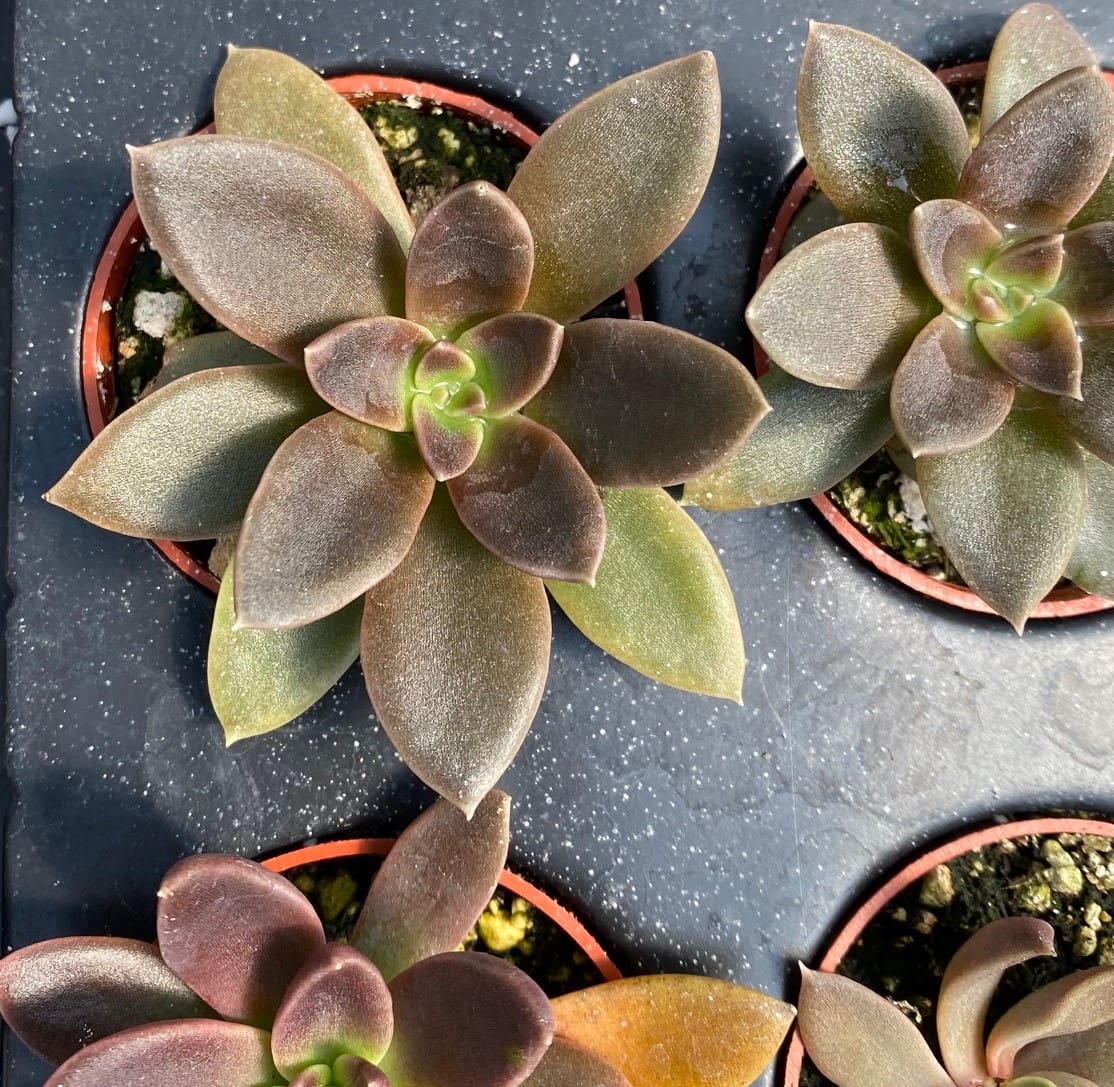
succulent sugar Echeveria, Brown Sugar 2" Potted PlantEcheveria 'Brown Sugar' The Sweetheart of the Succulent World If youre looking for a succulent that brings warmth, richness, and undeniable charm to your collection, Echeveria Brown Sugar is a must have. With its caramel toned rosettes and velvety texture, this plant adds a cozy, earthy elegance to any spacewhether indoors on a sunny windowsill or outside in a rock garden. But 'Brown Sugar' isn't just a pretty face. It's also easy to care for,
Echeveria 'Brown Sugar'
The Sweetheart of the Succulent World
If you’re looking for a succulent that brings warmth, richness, and undeniable charm to your collection, Echeveria ‘Brown Sugar’ is a must-have. With its caramel-toned rosettes and velvety texture, this plant adds a cozy, earthy elegance to any space—whether indoors on a sunny windowsill or outside in a rock garden.
But 'Brown Sugar' isn't just a pretty face. It's also easy to care for, resilient, and incredibly rewarding to grow. Whether you're a first-time succulent owner or a seasoned collector, this Echeveria has something special for everyone. Let’s explore what makes this plant such a standout, and how to help it thrive.
What Makes 'Brown Sugar' So Special?
Echeveria ‘Brown Sugar’ is a hybrid succulent with fleshy, spoon-shaped leaves that form tight, symmetrical rosettes. The leaves are a rich bronze to cinnamon-brown, often with a soft velvet-like texture and a slight pink or copper blush under strong light. The color deepens with sun exposure and changes slightly with the seasons, making it a living piece of art.
At maturity, the rosettes can reach about 4 to 6 inches wide, staying compact and tidy. In spring or summer, you may be treated to a tall flower stalk bearing bell-shaped blooms in shades of coral or salmon—an extra treat from an already stunning plant.
How to Grow Echeveria 'Brown Sugar'
Let’s break down what this beauty needs to stay healthy and happy:
1. Light: Lots of Bright Light!
This plant loves sunlight. To bring out its best color and maintain that tight rosette shape, give it:
-
6+ hours of bright, indirect light each day
-
A south or east-facing window if grown indoors
-
Outdoors, morning sun with afternoon shade is ideal in very hot climates
Without enough light, the rosettes will stretch (a process called etiolation), and the color may fade to a dull green. Sunlight is the secret to that rich “brown sugar” tone!
2. Water: Less is More
Echeverias are desert natives. They don’t like wet feet. Overwatering is the #1 killer of these plants.
-
Let the soil dry out completely between waterings
-
Use the “soak and dry” method—water thoroughly, then wait
-
In winter, reduce watering even further
Pro Tip: Always water at the base of the plant. Avoid getting water in the rosette to prevent rot.
3. Soil: Fast-Draining is Key
Echeveria 'Brown Sugar' needs soil that drains quickly. Use:
-
A succulent/cactus mix, or
-
DIY: 2 parts potting soil + 1 part perlite + 1 part coarse sand
This helps prevent water from sitting around the roots, which can cause rot.
4. Container: Use Pots with Drainage
Always plant your echeveria in containers with drainage holes. This allows excess water to escape and keeps the roots healthy.
Terracotta pots are a great option because they’re breathable and help wick moisture away.
5. Temperature: Loves Warmth, Hates Frost
Echeveria ‘Brown Sugar’ prefers temps between 65°F and 80°F. It can handle short dips into the 40s, but freezing temps will kill it.
If you live in USDA zones 9–11, you can grow it outdoors year-round. Elsewhere? Keep it in a pot and bring it inside when temps drop below 50°F.
6. Fertilizer: Just a Little
You don’t need to fertilize often. But a light boost in spring and summer helps.
-
Use a diluted, balanced liquid fertilizer (half-strength)
-
Apply once a month during the growing season
-
Avoid fertilizing in fall and winter
How to Propagate 'Brown Sugar'
This succulent makes it easy to grow your collection or share with friends. You can propagate using:
-
Leaf cuttings: Gently twist off a healthy leaf, let it callous for a day or two, then place it on dry soil
-
Offsets (chicks): These appear at the base of mature rosettes and can be gently removed and replanted
-
Stem cuttings: If your plant gets leggy, cut the top rosette and replant it after it callouses
Give your cuttings a few weeks and you’ll see tiny roots forming. Before you know it, you’ll have a new little ‘Brown Sugar’ to nurture.
Common Problems and Solutions
Even easy plants can hit a bump now and then. Here’s how to troubleshoot the most common issues:
-
Rotting leaves or base? → Too much water or poor drainage. Let soil dry and check your pot.
-
Stretchy, pale growth? → Not enough light. Move to a sunnier spot.
-
Leaf drop or shriveling? → Underwatering. Give it a deep drink and adjust your watering routine.
-
Mealybugs? → Wipe with rubbing alcohol and keep the area dry and well-ventilated.
Stay alert, and your plant will reward you with beauty and resilience.
Display Ideas for Echeveria 'Brown Sugar'
This plant is compact and versatile, so you’ve got options when it comes to showing it off:
-
Use in mixed succulent arrangements for contrast—it pairs beautifully with blue or green varieties
-
Plant in shallow terracotta bowls with top dressing gravel for a clean, modern look
-
Display in ceramic pots with neutral tones to highlight the rich leaf color
-
Combine with driftwood or rocks in a zen-style garden tray
Because it stays small and tidy, it’s perfect for desktops, windowsills, kitchen counters, or patio tables.
Why You’ll Love It
Echeveria 'Brown Sugar' brings more than just looks—it’s a plant with personality. It’s sweet but tough, stylish but low-maintenance. And when you see that rosette glowing in the light, you’ll understand why succulent lovers can’t get enough of it.
Whether you’re filling a fairy garden, styling your windowsill, or building a living wall, 'Brown Sugar' delivers warmth, beauty, and ease. It’s the kind of plant that makes you pause and smile.
So go ahead—treat yourself to something sweet. Echeveria ‘Brown Sugar’ is waiting to add that perfect touch to your space.
Shipping Notes
- Free Standard Shipping on $100+ Orders to the USA.
- Except Preorder products are shipped in 48 hours.
- Delivery to the USA:
- Standard Shipping : 3-10 business days
- If time is of the essence, please consider selecting expedited delivery for faster service.
Exchange/Return Notes
- We offer a 30-day return/exchange service after receiving.
- Final sale items are not eligible for returns or exchanges.
- To process your return/exchange, please contact us at [email protected]
- Please click here for more details>>> Return & Exchange Policy